


-
About UsHebei Derui Chemical Co., Ltd. (hereinafter referred to as Derui Chemical) was established in January 2006 with a registered capital of RMB 51.8 million. The company specializes in the production and sale of agrochemicals, with its main products including thiamethoxam technical grade, imidacloprid technical grade, spirotetramat technical grade, and related formulated products.

-
Product CenterThe company is committed to building and continuously improving its management systems, and in 2020 it obtained certifications under GB/T 19001-2016/ISO 9001:2015, GB/T 24001-2016/ISO 14001:2015, and GB/T 45001-2020/ISO 45001:2018. Derui Chemical has consistently upheld the corporate mission of “pursuing green development and serving global agriculture,” while adhering to the core values of “integrity, innovation, pragmatism, and gratitude.” The company is eager to collaborate with its partners to contribute to the advancement of global agriculture.
-
BlogThe company places great emphasis on standardized management and sustainable development, successfully obtaining certification for its three major management systems—quality, environment, and occupational health and safety—in 2020. These certifications align with GB/T 19001-2016/ISO 9001:2015, GB/T 24001-2016/ISO 14001:2015, and GB/T 45001-2020/ISO 45001:2018. Derui Chemical remains committed to its corporate mission of promoting green development and serving global agriculture, upholding the core values of “integrity, innovation, pragmatism, and gratitude.” We look forward to partnering with stakeholders from all sectors, pooling our strengths, and advancing together to support the steady growth of global agriculture.

A Brief Discussion on Information Security Risks of Printers
Release Date:
2023-10-12
With the advancement of technology, the maturation of the supply chain, and the widespread adoption of commercial applications, laser printers have made tremendous strides in recent years—reducing in size, enhancing performance and functionality, and lowering costs—making them a staple for both business offices and home printing.
The printer industry has high barriers to entry.
The global laser printer (including copier) industry has a development history spanning more than 50 years. Although the market size is relatively modest, the industry features high barriers to entry. It was only after Chinese companies broke through export restrictions and entered this sector that, to this day, there are roughly a dozen manufacturers worldwide that have fully mastered the independent research, development, and manufacturing of laser printers. The key barriers to entry in the printer industry are reflected in the following aspects:
Patent barriers are high. Globally, there are hundreds of thousands of printer‑related patents, the vast majority filed by U.S. and Japanese companies, with over 200,000 still in force today. Many of these patents do not protect genuine technological innovation but rather specific technical control methods tailored to particular use cases—methods that can nonetheless secure patent protection. Companies file numerous patents on the same technology, function, or component, each from a different angle, creating an impenetrable web of intellectual property that makes it exceedingly difficult for later entrants to break through. For example, regarding automatic duplex printing when the total number of pages is odd, one company has patented “treating the last page as single‑sided,” while another has patented “pre‑inserting a blank page at the end of the document so that the final page is also printed double‑sided.” There are even patents granted for such measures as “the printer retries after detecting a paper‑feed error” or “the fuser stops heating when its temperature exceeds the upper limit and resumes heating when it falls below the lower limit.”
The technological barriers are high. The development of a printer is a complex systems engineering endeavor, with technical expertise spanning more than ten fields, including precision mechanics, fine chemistry, precision optics, electrostatic imaging, integrated circuits, electrical engineering, software engineering, communications engineering, color science, automatic control, and polymer materials. Out of concern for maintaining technological exclusivity, foreign companies are reluctant to cultivate Chinese‑national core technical talent or establish China‑based core suppliers. Moreover, the components used in different printers often require custom‑designed solutions, and each model necessitates the creation of hundreds, sometimes even nearly a thousand, sets of molds. The R&D process for every product must accommodate dozens of operating systems on computers and mobile devices, as well as hundreds of application software packages. Testing each printer entails evaluating its performance across hundreds of paper types, simulating thousands of usage scenarios, and executing tens of thousands of test cases. As a result, breaking through these numerous technical domains demands substantial human resources and significant investment, leading to a lengthy overall development cycle.
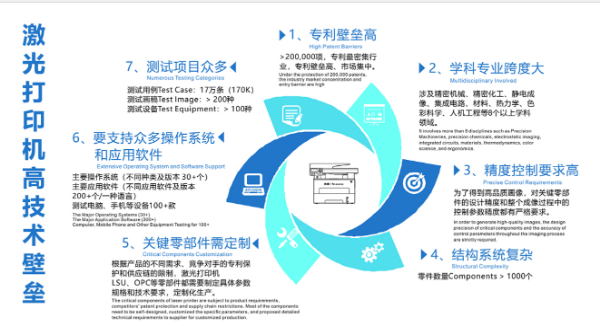
The supply chain is closed. Printer components from different manufacturers lack a unified standard; even among parts for different models, beyond differences in mechanical dimensions and materials, there are numerous variations in physical and chemical parameters related to electrostatic imaging. For core components, printer manufacturers typically develop and produce them in-house or collaborate with overseas suppliers under exclusive agreements, filing extensive patent applications for protection. Even when component suppliers with relevant experience in other industries express both the willingness and capability to develop certain core printer parts, established printer OEMs are reluctant to grant them access to this market. As a result, new entrants into the printer‑OEM space face severe supply-chain challenges right from the outset.
Printers pose significant security risks.
Printers are input/output devices that enjoy a high degree of trust from office computers. They not only directly handle confidential print and copy jobs but can also collect users’ sensitive information through software installed on PCs, tablets, or smartphones. All printers come equipped with flash memory, and some high-end models—such as multifunction copiers—often include large-capacity hard drives, effectively turning them into network‑based storage servers capable of actively gathering user data. Due to the unique functions and usage scenarios of printers, they present more potential avenues for information leakage than computers or mobile phones, making them easier for attackers to exploit. Coupled with their customized, closed operating systems—precluding the installation of antivirus or security‑control software—and the covert nature of data‑exfiltration methods, combined with users’ limited awareness of risks and weak preventive measures, there are few effective information‑security safeguards for printers, and those that do exist tend to be inadequate. Consequently, techniques for implanting malicious code into printers or activating existing malware stored within them are numerous and difficult to detect and mitigate. Certain untrusted printers connected to our office networks are akin to dormant cancer cells lurking in our bodies: they can be activated at any time, posing threats such as network outages, file deletions, and system crashes. The primary channels through which attackers exploit printers to steal information or launch cyberattacks can be broadly categorized as follows:
Utilize the Internet. Many printers offer internet connectivity via Ethernet cables or wireless modules such as Wi‑Fi, enabling shared printing and remote printing. After installation, some printers frequently exchange data with overseas servers over the internet. This pathway can be exploited to exfiltrate users’ sensitive information or to receive remote control commands and malicious code. Some printers lack built-in networking capabilities but can join your office network through a computer connected via USB, thereby facilitating shared printing. If devices on the office network are connected to the internet, even printers without native networking can leverage this connection as a springboard to communicate with external systems.
Leveraging the internal network. Whether or not it has network capabilities, a printer can serve as a device connected to the office network. In addition to accessing documents that users have already printed, printers may also gain access to confidential files stored on users’ computers—files that have not yet been printed—and save them in the printer’s memory. If vulnerabilities or pre‑configured backdoors in an untrusted printer are discovered and exploited by insiders—such as spies—the information stored on the device could be exfiltrated. Typically, computers trust printers, making them an easy foothold for malicious internal users to bridge between different machines, bypass network‑management controls, steal data from other systems, or launch targeted attacks.
Leveraging consumables and accessories. Most printer consumables are equipped with chips, which typically serve functions such as device identification, print‑count tracking, estimation of remaining consumable life, and retrieval of print‑control parameters specific to that consumable. In addition to consumables, certain printer accessories may also incorporate similar chips or covertly have wireless chips installed in hidden locations. If a printer designer intends to engage in malicious data exfiltration, they might select chips with large storage capacities and, when necessary, program the printer to offload users’ sensitive information onto those chips. Malicious actors could likewise exploit chips embedded in new consumables or accessories to deliver malware, activation commands, or other payloads to the printer, thereby launching attacks against office systems.
Take advantage of on-site maintenance opportunities. Prolonged wear can compromise component precision, and polymeric materials tend to degrade in performance over time. High‑volume, high‑end printers—especially copiers and production‑grade models—require regular maintenance akin to automotive servicing. Given the complex architecture of printers, which varies significantly from one model to another, and the near‑total lack of part interchangeability, repairing or replacing components is highly challenging. Consequently, maintenance and repair must be performed by external specialists who are thoroughly familiar with the specific model, posing substantial information‑security risks to users. Printers often include debugging interfaces, and may even harbor deliberately concealed communication ports. Test instruments such as multimeters and oscilloscopes can be modified to enable communication with the printer, allowing attackers to extract and store data while also injecting malicious code or activating harmful functions. Furthermore, service technicians might exploit specific key combinations on the printer’s control panel to activate hidden features pre‑installed within the device.
By leveraging printer paper, users can add visible watermarks to printed documents when needed. There is also an alternative—less conspicuous watermarking techniques, such as steganography—which include subtle yellow dots, localized font adjustments, minute changes in text position or size, and modifications to image halftone algorithms and parameters. If sensitive information is embedded into our printed materials using such steganographic methods, it could pose a risk of data leakage. Furthermore, when we photocopy confidential documents, sensitive keywords within the files may be detected by the printer, enabling unauthorized data exfiltration or triggering hidden malicious functions.
Installing covert data‑exfiltration devices. Printers with inadequate security protections may have vulnerabilities that hackers can exploit remotely to carry out data theft or launch attacks. Once a printer with insufficient safeguards is disassembled, attackers can modify its firmware to enable data exfiltration and other malicious activities; they might even install a communication module inside the device to transmit user information via wireless signals or power‑line communication, or to send commands to the printer that activate malicious code or harmful functions.
As printer users—particularly organizations with stringent confidentiality requirements—information leaks can pose significant risks and losses. To make our daily information security management more effective, we must not overlook the proper selection and management of printers. The espionage and attack techniques discussed earlier are all carried out through a printer’s software and hardware, often stemming from the manufacturer’s deliberate malice. Therefore, a printer’s trustworthiness, along with its built-in security enhancements and protective features, should be key considerations when choosing a product. As domestic manufacturers gain greater market presence, user awareness of information security risks continues to rise, and national regulations on the information security of printing devices become increasingly stringent, these latent information‑security threats will gradually recede from the office environment. (Yin Aiguo, Member of the National Information Security Standardization Technical Committee, Member of the Hefei Municipal Political Consultative Conference, and Chief Technology Officer of Nastar Co., Ltd.)
[Editor-in-charge: Tang Binni]
Source: Xinhua Net
Tags:
More information
Contact Us
Address:
No. 1, No. 1, New District Road No. 1, Gaocheng District, Shijiazhuang City, Hebei Province
WeChat/WhatsApp:
Phone:
Email:
